How to download the Maximus template for Powerpoint
1. On this same page, scroll down to the download block until you see the buttons. 2. Click on the button below the presentation features that says 'Download Maximus as a Free PowerPoint template'. 3. Once done it will start downloading a .pptx file that you can edit in PowerPoint. 4. If we do not have the powerpoint file we will direct you to the original source so you can download it. 5. If the fonts used in the template are not on your computer, you should download and install them for the template to display correctly. You can find the fonts in the original font link. 6.Source:slidesmedia.com
How to download the template Maximus in Google Slides
1. Just like the powerpoint version, scroll to the bottom of the template features. 2. You can now click on the button that says 'Use Maximus as a Google Slides theme'. 3. A new window will open with a larger preview. If you want to use the template, click the Use template button in the upper right corner. 4. A copy of the document will be added to your Google Drive account and you will be able to edit, add or delete slides.
Preview
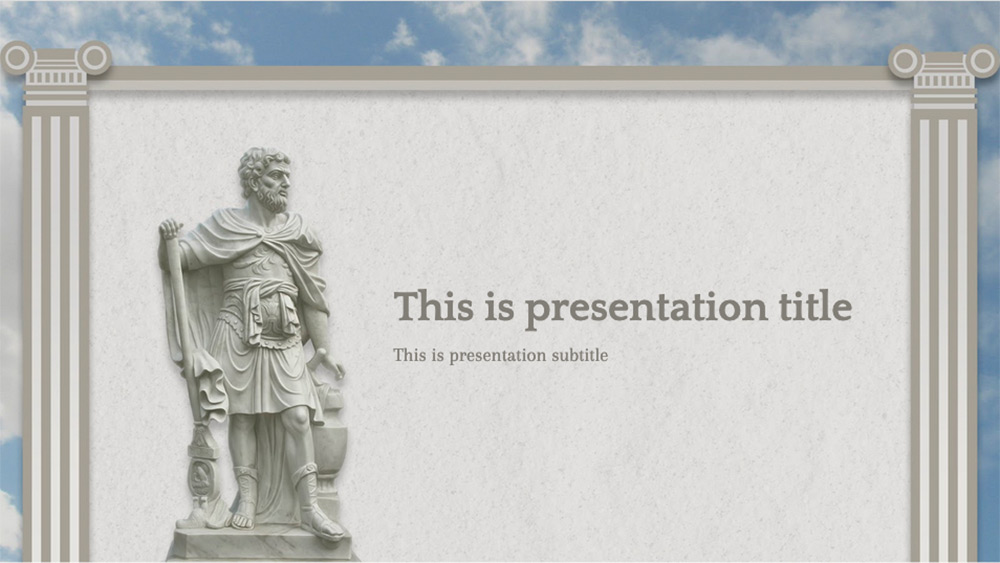
The following is a presentation that can be very useful in explaining the concepts of the Roman Empire. Maximus is a presentation that uses all the imagery of the civilization that completely dominated the Mediterranean Sea to make the concepts much easier to assimilate. All the images that represent the Romans in sculptures, busts and so on are free to use, so you can use each one in the slides you want. This presentation is ideal for teaching purposes and even for your presentations at school, high school and even at university
Download the PowerPoint template or Google Slides theme Maximus free of charge. With this template you can create presentations simple. This theme includes the color brown.
Features
- Template in which it is easy to edit text and images
- 17 slides of different styles
- Elegant design ideal for presenting concepts about the Roman Empire or Rome.
- Contains example of use of tables.
- Includes reference to access a family of hundreds of editable icons
- Available for use as a theme on Google slides or to download as a Powerpoint template. Can also be exported to PDF, JPG, etc.
- 16:9 ratio can be changed to 4:3 on Google or Powerpoint slides, although you will have to check the graphic elements.